- Home Page /
- Electronics /
- Computer Accessories /
- Computer Accessories & Peripherals /
- Cables & Accessories /
- Cables & Interconnects /
- USB Cables /
- Victron Energy Interface MK3-USB (VE.Bus to U...
0 ratings


Item #:
220580373
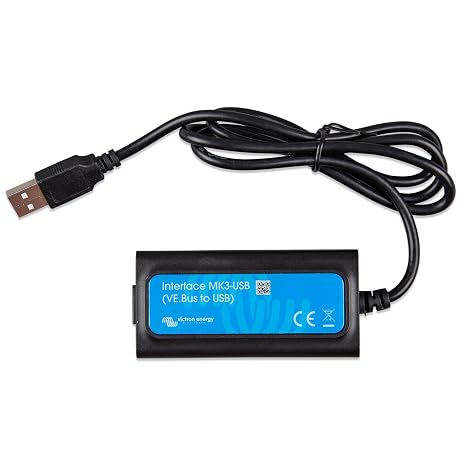
Victron Energy Interface MK3-USB (VE.Bus to USB)
87% of respondents would recommend this to a friend
Item #:
220580373
MMK 321455
Price Details
Excluding Shipping & Custom charges ( Shipping and custom charges will be calculated on checkout )
*All items will import from US
0 ratings
Write a review
In stock
 Imported from USA store
QTY:
Order now and get it around Sunday, September 20
Secured transaction
Ubuy works hard to protect your security and privacy. Our advanced payment security system ensures confidentiality by encrypting your information during transmission using AES (Advanced Encryption Standards) and SSL (Secure Socket Layer) protocols. Your payment details are 100% secure as we do not share your payment details with third party sellers.
Our Top Logistics Partners


Configure and update your Victron Energy products effortlessly with the VE Interface MK3-USB.

Fast
Shipping

Free
Return*

Secure Packaging

100% Original Products

PCI DSS Compliance

ISO 27001 Certified



Note: Step Down Voltage Transformer required for using electronics products of US store (110-120). Recommended power converters Buy Now.


What Stands Out
USB Connectivity
Seamlessly connects VE.Bus equipment to USB-enabled devices, providing easy access for configuration and monitoring without complex setups.
User-Friendly Interface
Designed for users of all skill levels, the Interface MK3-USB simplifies communication with Victron devices, making it accessible for both professionals and enthusiasts.
Reliable Performance
Engineered for durability and consistent performance, ensuring stable connections and long-lasting operation in various demanding environments.
Product Details
| Compatible Devices | Laptop |
| Specific Uses For Product | Configuring and updating firmware on products Victron Energy |
| Connector Type | USB |
| Number of Ports | 1 |
| Power Plug Type | No Plug |
| Brand | Victron Energy |
| Model Number | ENG-VT-00033 |
| Manufacturer | Victron Energy |
| Built-In Media | Victron Energy Interface MK3-USB (VE.Bus to USB) |
| Item Type Name | Victron Energy Interface MK3-USB (VE.Bus to USB) |
| Mfr Part Number | ASS030140000 |
| Item Dimensions | 3.94 x 1.18 x 7.87 inches (10 x 3 x 20 cm) |
| Item Weight | 5.67 g |
| Package Quantity | 1 |
| Unit Count | 1 Count |
| Number of Items | 1 |
| Color | Black |
| EU Spare Part Availability Duration | 5 tyears |
| Item dimensions L x W x H | 3.94 x 1.18 x 7.87 inches (10 x 3 x 20 cm) |
| Package Weight | 2.53 Pound (1.15 kg) |
Who Should Buy?

-
Marine Enthusiasts
Ideal for boat owners needing reliable monitoring and configuration of their Victron equipment via USB.
-
Off-Grid Users
Perfect for individuals living off-grid who rely on Victron energy systems for efficient power management.
-
Battery Management
Beneficial for those managing battery systems, allowing for detailed analysis and configuration using a PC.

-
Basic Users
Not suitable for users with minimal technical knowledge who may struggle with complex configurations.
Product Description
Victron Energy Interface MK3-USB (VE.Bus to USB)
Have any Query? Chat with us
Customer Questions & Answers
-
Question:
What is the Victron Energy Interface MK3-USB VE.Bus to USB used for?
Answer: The Victron Energy Interface MK3-USB VE.Bus to USB is primarily used to connect your Victron Energy VE.Bus products to a computer via USB. This allows users to configure devices, access real-time parameters, and download historical data. By interfacing directly with Victron's software, you can optimize the performance of your energy systems. For instance, if you're managing a solar power system, you can monitor energy generation and storage, ensuring that your setup works efficiently during peak sunlight hours. -
Question:
Is the MK3-USB compatible with all Victron products?
Answer: No, the MK3-USB is specifically designed for use with Victron Energy products that feature the VE.Bus communication protocol. Devices such as MultiPlus and Quattro inverters are fully compatible. It's important to check your device specifications prior to purchase. For example, if you're looking to connect a MultiPlus inverter to your laptop for configuration, the MK3-USB will facilitate that connection without any compatibility issues. -
Question:
How do I install the Victron Energy MK3-USB interface?
Answer: Installing the Victron Energy MK3-USB is straightforward. Simply connect the interface to your VE.Bus device and your computer via the USB port. Next, download the VictronConnect software from the Victron Energy website. Launch the software to start configuring your device. This user-friendly approach ensures that even those unfamiliar with technical setups can easily manage their energy systems. For example, if you are a recreational vehicle owner, this simplifies monitoring your battery status and optimizing power usage. -
Question:
Can I use the MK3-USB on multiple devices?
Answer: Yes, the Victron Energy MK3-USB interface can be used with multiple VE.Bus devices, but only one device can be connected to the computer at a time. If you're managing several devices, you'll need to disconnect the MK3-USB from one and connect it to the next when you want to configure or monitor it. This is particularly beneficial for users with multiple Victron inverters or battery management systems, making it easier to switch between configurations without the need for additional hardware. -
Question:
Does the MK3-USB require any additional software?
Answer: Yes, the MK3-USB is designed to work with the VictronConnect software, which is available for both Windows and Mac. This software enables comprehensive monitoring, settings adjustment, and historical data analysis for your Victron devices. By utilizing this software, users can gain insights into performance metrics and make that much-needed adjustments on the go. For example, if an RV user is running into power management issues, this software can help diagnose and resolve configuration problems efficiently. -
Question:
What type of cable does the MK3-USB utilize?
Answer: The Victron Energy MK3-USB interface uses a USB Type-A connector to connect to your computer and a VE.Bus connection for the Victron device. This ensures a reliable and efficient connection for data transfer. You won't need any additional cables beyond what is included. For instance, a boat owner can conveniently connect this interface while docked to fine-tune settings for onboard energy consumption without requiring complicated setups. -
Question:
Can I use the MK3-USB with a smartphone or tablet?
Answer: The MK3-USB is designed for connection with a computer and is not directly compatible with smartphones or tablets. However, if you have a computer or a laptop, you can configure your devices there and later use the VictronConnect app on your mobile for monitoring purposes. This flexibility provides users with the ability to manage their energy systems from various devices, enhancing convenience in both home and mobile energy management setups. -
Question:
Are there any precautions I should take when using the MK3-USB?
Answer: When using the Victron Energy MK3-USB Interface, ensure that all connections are secure and that the device is powered on before connecting to your computer. Avoid connecting or disconnecting the USB while the VE.Bus device is powered off, as this could lead to corrupted data or improper configurations. For example, if a user is adjusting settings, maintaining proper handling of connections can prevent software issues, ensuring the energy system operates smoothly. -
Question:
Where can I buy Victron Energy Interface MK3-USB VE.Bus to USB in Myanmar?
Answer: You can purchase the Victron Energy Interface MK3-USB VE.Bus to USB from Ubuy. They offer a convenient online shopping experience and often have a diverse range of Victron Energy products available for Canadian customers. -
Question:
Is there any warranty or support provided with the MK3-USB?
Answer: Yes, the Victron Energy MK3-USB typically comes with a standard warranty, which can vary based on the retailer and specific product line. The warranty will cover manufacturing defects, giving users peace of mind. Additionally, Victron Energy provides robust customer support, including documentation, FAQs, and forums, making it easy for users to find solutions and troubleshoot potential issues. This support is invaluable for advanced users looking to optimize their energy systems.
Victron Energy USB Cables ENG-VT-00033 Editorial Review
Victron Energy Interface MK3-USB (VE.Bus to USB) is an essential tool for configuring and updating firmware on Victron Energy products, particularly useful for devices like the Victron Multiplus II inverter. It connects via a standard USB-A male connector and requires an adapter for tablets or smartphones. This makes it a versatile solution for those needing to manage complex inverter configurations. Users have noted its effectiveness when paired with devices like a Windows PC but must keep in mind that it doesn't work with Apple iPhones. Many find it essential for maintaining their systems, although it may not be frequently used.
Customer Reviews & Ratings
1 customers ratings
-
5 Star
100%
-
4 Star
0%
-
3 Star
0%
-
2 Star
0%
-
1 Star
0%
Review this product
Share your thoughts with other customers
Pros
- Compatible with Windows for firmware updates
- Easy to use for configuring Victron devices
- Lightweight design at 5.67 grams
- Works well with VictronConnect app
- Suitable for advanced users and installers
Cons
- May be a bit complex for casual users
Platform Trust & Buyer Confidence

JK
Jasmin
Verified buyer
“Great products and very good service: very easy and very fast international delivery.”
9 September 2026 · via Trustpilot
AG
Anke
Verified buyer
“Wonderful online shopping experience, smooth transaction from the start. Payment method works conveniently and delivery is unexpectedly fast and reliable. You go the extra mile for service. What makes this even more amazing, you deliver to Namibia. I will remain a happy Ubuy customer and will increase my purchases for sure! Thank you!”
10 September 2026 · via Trustpilot
H
Hazel
Verified buyer
“Very easy to find the products what you need, and so fast delivery, that’s why I highly recommended to others costumers to used ubuy.”
10 September 2026 · via Trustpilot
O
Opaleye
Verified buyer
“I received exactly what I ordered I was skeptical about your site because that was my first time to order. But the order came timely and neatly packaged. I was not disappointed. Thank you.”
11 September 2026 · via Trustpilot
AC
Adele
Verified buyer
“Easy to find and order what you want on the website. Delivery is quick to the UK”
8 September 2026 · via Trustpilot
Secure Checkout
Global Delivery
Easy Returns
Genuine Products
Product Price History
Important information
- Limitations : For products shipped internationally, please note that any manufacturer warranty may not be valid; manufacturer service options may not be available; product manuals, instructions, and safety warnings may not be in destination country languages; the products (and accompanying materials) may not be designed in accordance with destination country standards, specifications, and labeling requirements; and the products may not conform to destination country voltage and other electrical standards (requiring use of an adapter or converter if appropriate). The recipient is responsible for assuring that the product can be lawfully imported to the destination country. When ordering from Ubuy or its affiliates, the recipient is the importer of record and must comply with all laws and regulations of the destination country.
- Not all the products listed on Ubuy are for sale, as Ubuy is a global search engine. Products are subject to export/trade regulations.
MMK 321455
Order now and get it around Sunday, September 20
This item is not restrict in my country.(Please click on above link if this item is not restrict in your country, So our team will review and allow.)
QTY:
Secured transaction
PCI DSS compliant and ISO 27001:2022 certified, with encrypted payments and full buyer protection on every order.
Our Top Logistics Partners
Fastest cross-border delivery
Features & Benefits
- Easily connect Victron Energy products to a computer.
- Configure settings and update firmware seamlessly.
- Compatible with a wide range of Victron Energy products.
- Compact design: 2 x 4 x 5 inches.
- Lightweight at just 1.59 lb for portability.
- Enhance the performance of your inverter/charger systems.
Ubuy Assurance
Experience worry-free shopping with 100% original products, PCI DSS-compliant payment security, ISO 27001-certified data protection, the fastest cross-border delivery, free returns *, and secure packaging on every order.