- Home Page /
- Electronics /
- Computers, Laptops and Tablets /
- Computer Accessories /
- Computer Keyboards & Mice /
- Computer Mouse & Mouse Pads /
- Wireless Mouse /
- Logitech MX Master 4 for Mac, Ergonomic Bluet...
0 ratings

Item #:
199057186
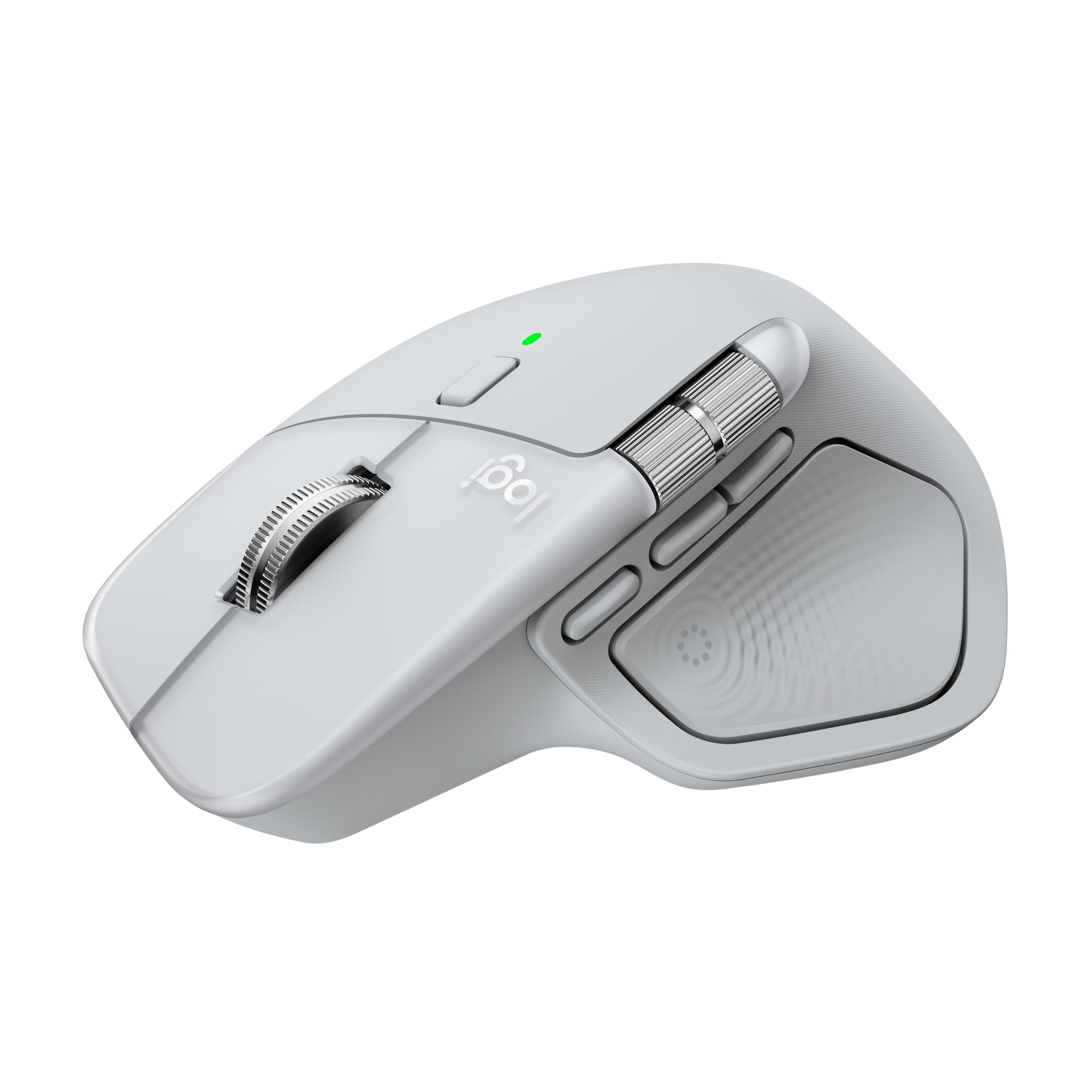
Logitech MX Master 4 for Mac, Ergonomic Bluetooth Mouse with Advanced Performance Haptic Feedback, Ultra-Fast Scrolling, USB-C Charging, White Silver
Item #:
199057186
MMK 556946
Price Details
Excluding Shipping & Custom charges ( Shipping and custom charges will be calculated on checkout )
*All items will import from US
0 ratings
Write a review
In stock
 Imported from USA store
QTY:
Order now and get it around Thursday, August 20
Secured transaction
Ubuy works hard to protect your security and privacy. Our advanced payment security system ensures confidentiality by encrypting your information during transmission using AES (Advanced Encryption Standards) and SSL (Secure Socket Layer) protocols. Your payment details are 100% secure as we do not share your payment details with third party sellers.
Our Top Logistics Partners


Experience haptic feedback on specific actions, shortcuts, notifications like switching desktops, slider adjustments and more.

Fast
Shipping

Free
Return*

Secure Packaging

100% Original Products

PCI DSS Compliance

ISO 27001 Certified


Note: Step Down Voltage Transformer required for using electronics products of US store (110-120). Recommended power converters Buy Now.


What Stands Out
Ergonomic Design
Designed for comfort, the MX Master 4 reduces hand fatigue with its sculpted shape, making it ideal for long hours of use, enhancing productivity without sacrificing user comfort.
Advanced Haptic Feedback
Experience tactile feedback with each scroll, allowing for precise control and enhanced interaction, setting it apart from competitors by enriching the user experience.
USB-C Charging
Enjoy quick recharging with USB-C, offering modern connectivity. A full charge lasts up to 70 days, combining convenience with high performance for effortless usability.
Product Details
| Brand | Logitech |
| Mouse type | Laser Mice |
| Color | Silver |
| Connection | USB Type C |
| Wireless | Bluetooth;RF |
| Motion detect | Optical |
| Buttons | 8 |
| Dexterity | Right-Handed |
| Battery consumption type | Integrated Rechargeable Battery |
| Features | Rechargeable |
| Power type | Battery |
| Battery size | Proprietary Device Specific |
| Model name | Logitech MX Master 4 for Mac |
| Maximum transmission range | 33 ft |
| Compatible OS | macOS 13 or later*, iPadOS 15 or later**. (*Customize device by installing the Logi Options+ App available for recent versions of Windows and macOS at app.logi.com, **Device basic functions will be supported without software for other systems than Windows and macOS) |
| Weight | 0.33 lb (150 grams) |
| Height | 5.05 in (12.8 cm) |
| Batteries | 1 |
| Orientation | Horizontal |
| Recommended use | Office |
| Accessories included | MX Master 4 for Mac wireless mouse; User documentation |
| Finish | Matte |
| Retail packaging | Single Piece |
| Multipack quantity | 1 |
Who Should Buy?

-
Creative Professionals
Ideal for designers and editors who require precision and customizable buttons for efficient workflow and performance.
-
Office Workers
Perfect for daily office tasks, offering ergonomic design, comfort, and advanced features for prolonged usage.
-
Mac Users
Seamlessly integrates with Mac systems, leveraging advanced haptic feedback and fast scrolling tailored for Mac environments.

-
Casual Users
May be too advanced and feature-rich for those who need a basic mouse for occasional use.
Product Description
Logitech MX Master 4 for Mac, Ergonomic Bluetooth Mouse with Advanced Performance Haptic Feedback, Ultra-Fast Scrolling, USB-C Charging, White Silver
Have any Query? Chat with us
Customer Questions & Answers
-
Question:
What is the battery life of the MX Master 4 for Mac?
Answer: Up to 70 days of battery life, plus three hours of use from a one-minute charge. -
Question:
Is the mouse compatible with Windows as well?
Answer: The MX Master 4 is primarily designed for Mac, but it can also work with Windows. -
Question:
What kind of connection does it use?
Answer: It connects via Bluetooth and includes a USB-C dongle for enhanced connectivity.
Logitech Wireless Mouse Editorial Review
The Logitech MX Master 4 for Mac has garnered a highly positive reception among users, particularly for its ergonomic design and advanced functionality tailored for Mac users. Many reviews highlight the mouse's ease of setup and customization, making it an ideal choice for a variety of applications, including video editing and CAD software like Fusion 360. Users Consistently praise its performance, describing it as an exceptional productivity tool that enhances their workflow. The mouse boasts several notable features such as haptic feedback, ultra-fast scrolling, and USB-C charging. The side-to-side scrolling capability is often mentioned as a revolutionary addition that significantly improves navigation. Ergonomics is another strong point, with users noting that the MX Master 4 fits comfortably in hand and minimizes wrist fatigue during extended use. However, some users have commented that the mouse is heavier than expected, which may affect its portability for some. While the Logitech software is required to unlock the full potential of the mouse, users appreciate the customizable options it provides. One minor drawback noted is that the mouse does not appear natively in macOS, requiring additional steps for full functionality. Despite this, the overall Consensus is that the MX Master 4 for Mac is a top-tier product that stands out in its category, particularly for those who frequently work on their Macs and require a precise and efficient input device. **
Customer Reviews & Ratings
1 customers ratings
-
5 Star
0%
-
4 Star
100%
-
3 Star
0%
-
2 Star
0%
-
1 Star
0%
Review this product
Share your thoughts with other customers
Pros
- Ergonomic design reduces wrist fatigue
- Easy setup and extensive customization options
- Excellent performance for tasks like video editing and CAD
- Innovative side-to-side and quick scrolling features
- Haptic feedback enhances user experience
- USB-C charging for convenience
Cons
- Heavier than some users prefer
Platform Trust & Buyer Confidence

MA
Mohammad
Verified buyer
“Excellent quality and original too,when ubuy send original things I will appreciate that ,I very satisfied thank you”
23 July 2026 · via Trustpilot
CK
Chitra
Verified buyer
“The order and delivery progress was communicated very well. Package arrived within the estimated time. Products arrived as expected in good condition.”
22-Jul-26 · via Trustpilot
K
kund
Verified buyer
“Good supply of products. Safe payment methods, and shipment worldwide! Genuine products.”
23-Jul-26 · via Trustpilot
OO
Onesi
Verified buyer
“Was my first time buying a product from Ubuy, but I found it so helpful. This is reliable. Gonna place a new order!”
22 July 2026 · via Trustpilot
SJ
SAO JOHN
Verified buyer
“Ubuy is a great online platform to buy stuff. Reliable, fast delivery time and great value for money. I've been using Ubuy online shopping platform for three years now and will continue to do so.”
23 July 2026 · via Trustpilot
Secure Checkout
Global Delivery
Easy Returns
Genuine Products
Product Price History
Important information
- Limitations : For products shipped internationally, please note that any manufacturer warranty may not be valid; manufacturer service options may not be available; product manuals, instructions, and safety warnings may not be in destination country languages; the products (and accompanying materials) may not be designed in accordance with destination country standards, specifications, and labeling requirements; and the products may not conform to destination country voltage and other electrical standards (requiring use of an adapter or converter if appropriate). The recipient is responsible for assuring that the product can be lawfully imported to the destination country. When ordering from Ubuy or its affiliates, the recipient is the importer of record and must comply with all laws and regulations of the destination country.
- Not all the products listed on Ubuy are for sale, as Ubuy is a global search engine. Products are subject to export/trade regulations.
MMK 556946
Order now and get it around Thursday, August 20
This item is not restrict in my country.(Please click on above link if this item is not restrict in your country, So our team will review and allow.)
QTY:
Secured transaction
PCI DSS compliant and ISO 27001:2022 certified, with encrypted payments and full buyer protection on every order.
Our Top Logistics Partners
Fastest cross-border delivery
Features & Benefits
- Customizable haptic feedback enhances productivity and control.
- Access favorite tools quickly with the dynamic Actions Ring.
- Enjoy fast, precise scrolling with the MagSpeed scroll wheel.
- Ergonomic design reduces hand stress for comfortable usage.
- Experience 90% less click noise for a focused working environment.
- Includes a complimentary 1-month Adobe Creative Cloud subscription.
Ubuy Assurance
Experience worry-free shopping with 100% original products, PCI DSS-compliant payment security, ISO 27001-certified data protection, the fastest cross-border delivery, free returns *, and secure packaging on every order.