- Home Page /
- Electronics /
- Computer Accessories /
- Computer Accessories & Peripherals /
- USB Hubs /
- USB C Hub 5 in 1 Multiport Adapter, USB C Hub...
0 ratings

Item #:
127120990
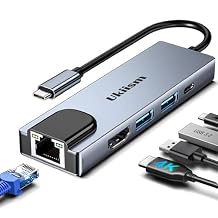
USB C Hub 5 in 1 Multiport Adapter, USB C Hub with 4K HDMI, Ethernet RJ45, 100W PD Charging, USB 3.0 Ports, Type C Docking Station for MacBook Pro
Item #:
127120990
MMK 32814
Price Details
Excluding Shipping & Custom charges ( Shipping and custom charges will be calculated on checkout )
*All items will import from US
0 ratings
Write a review
In stock
 Imported from USA store
QTY:
Order now and get it around Wednesday, July 22
Secured transaction
Ubuy works hard to protect your security and privacy. Our advanced payment security system ensures confidentiality by encrypting your information during transmission using AES (Advanced Encryption Standards) and SSL (Secure Socket Layer) protocols. Your payment details are 100% secure as we do not share your payment details with third party sellers.
Our Top Logistics Partners


This 5 in 1 USB C hub includes all the functions you need, providing seamless connectivity for all your devices.

Fast
Shipping

Free
Return*

Secure Packaging

100% Original Products

PCI DSS Compliance

ISO 27001 Certified


Note: Step Down Voltage Transformer required for using electronics products of US store (110-120). Recommended power converters Buy Now.


What Stands Out
Versatile Compatibility
This USB C Hub supports a wide range of devices, including MacBook Pro/Air and iPad Pro, ensuring seamless connectivity for various user needs and compatibility across multiple platforms.
4K HDMI Output
Enjoy stunning visuals with 4K HDMI capabilities, allowing users to connect to high-resolution displays effortlessly, providing an enhanced viewing experience for videos and presentations.
Power Delivery
Equipped with PD 100W, this hub allows fast charging while connecting multiple devices, ensuring no interruptions to your workflow with efficient power management and connectivity.
Product Details
| Item Weight | 0.5 lbs (230 grams) |
Who Should Buy?

-
Frequent Travelers
Compact design fits easily into a laptop bag, ideal for users needing connectivity on the go.
-
Content Creators
4K HDMI output supports high-resolution displays, great for video editing and presentations.
-
Remote Workers
RJ45 Ethernet connection offers stable internet access, perfect for home office setups requiring reliable connectivity.

-
Casual Users
Basic users may find little need for multiple ports or high-speed connections.
-
Older Devices
Devices lacking USB-C ports cannot utilize this hub’s features, limiting compatibility.
-
High-End Gamers
Gamers may require higher bandwidth solutions; may not be suitable for graphics-intensive gaming.
Product Description
USB C Hub 5 in 1 Multiport Adapter, USB C Hub with 4K HDMI, Ethernet RJ45, 100W PD Charging, USB 3.0 Ports, Type C Docking Station for MacBook Pro Air, iPad, Laptop
Have any Query? Chat with us
Customer Questions & Answers
-
Question:
What devices are compatible with the USB C Hub Ethernet HDMI Adapter?
Answer: The USB C Hub Ethernet HDMI Adapter is compatible with a wide range of devices, including the latest MacBook Pro, MacBook Air, and iPad models that possess a USB-C port. This compatibility allows you to seamlessly connect multiple peripherals such as monitors, keyboards, and external drives. If you often work on the go or require extra connectivity options, this hub is an excellent solution. For instance, you can connect your MacBook Pro to an external monitor for a dual-screen setup, enhancing productivity. -
Question:
How does the 4K HDMI output work on this docking station?
Answer: The 4K HDMI output on the USB C Hub allows you to connect to high-definition displays, providing crystal-clear visuals up to 4K at 30Hz. To utilize this feature, simply connect an HDMI cable from the hub to your monitor or TV. This makes it ideal for presentations, video editing, or gaming. For example, if you’re a graphic designer, using the 4K output will enable you to see your designs in stunning detail, ensuring your work looks immaculate. -
Question:
Can I charge my device while using the hub?
Answer: Yes, this hub supports Power Delivery (PD) up to 100W, allowing you to charge your laptop or tablet while using the other ports. By connecting a compatible charger to the USB-C port, you can maintain power to your device without interruptions. This feature is particularly useful for professionals who use their devices for long hours and rely on extended battery life. Imagine being on a video call while simultaneously charging your MacBook, thanks to this versatile hub. -
Question:
What is the maximum speed of the USB 3.0/2.0 ports?
Answer: The USB 3.0 ports provide transfer speeds of up to 5 Gbps, while the USB 2.0 ports offer standard speeds of 480 Mbps. This means you can quickly transfer large files, connect external drives, and utilize peripherals without any noticeable lag. For instance, if you need to back up important files from your HDD to your MacBook, using the USB 3.0 port will significantly reduce your time spent on data transfer, allowing you to focus on more pressing tasks. -
Question:
What does the RJ45 Ethernet port offer?
Answer: The RJ45 Ethernet port provides a reliable wired internet connection, offering faster and more stable internet speeds than typical Wi-Fi connections. This is essential in environments where a strong network is critical, such as when streaming high-definition content or downloading large files. For instance, if you’re working from a location with spotty Wi-Fi, connecting via Ethernet using this hub will ensure you maintain a stable connection, enhancing your overall productivity. -
Question:
Is the hub portable and travel-friendly?
Answer: Absolutely. The compact design of the USB C Hub makes it highly portable, perfect for travel and on-the-go use. It easily fits in your laptop case or bag without adding significant bulk. If you're a frequent traveler, you can effortlessly carry this hub to connect your devices wherever you are. For example, whether you’re working at a coffee shop or during business trips, this hub allows you to set up efficiently in any environment. -
Question:
Can I use this hub with multiple monitors?
Answer: This USB C Hub is designed to support one external monitor via the HDMI output, which allows for dual-screen setups effectively. However, it does not support multiple HDMI outputs simultaneously. If you're working on extensive projects that require more visual real estate, you can enhance your setup by using the HDMI output alongside your laptop display. For example, extending your workspace with one monitor for documents while editing on your laptop can boost your workflow. -
Question:
What is the material and build quality of this docking station?
Answer: The USB C Hub is built using high-quality aluminum, which not only provides durability but also aids in heat dissipation during extended use. This robust construction helps protect the internal components while giving the hub a sleek, modern look that complements your devices. If aesthetic appeal matters to you along with functionality, this hub accentuates your workspace while proving its resilience during daily use. -
Question:
How to set up the USB C Hub Ethernet HDMI Adapter?
Answer: Setting up the USB C Hub is straightforward: simply plug it into the USB-C port of your device. There are no extensive installation processes or software requirements needed. Once connected, you can immediately start using the various ports available. This simplicity makes it accessible for users of all technical proficiency levels. For instance, if you’re shifting from office work to remote work, you can quickly set up your workstation in minutes and begin your tasks. -
Question:
Where can I buy USB C Hub Ethernet HDMI Adapter?
Answer: You can purchase the USB C Hub Ethernet HDMI Adapter from Ubuy. Ubuy offers a convenient online shopping experience with a vast selection of tech products, ensuring you find exactly what you need. The user-friendly interface and customer support help facilitate any inquiries you may have about the product before making a decision.
ukiism USB Hubs Editorial Review
No editorial reviews found
Customer Reviews & Ratings
1 customers ratings
-
5 Star
100%
-
4 Star
0%
-
3 Star
0%
-
2 Star
0%
-
1 Star
0%
Review this product
Share your thoughts with other customers
Platform Trust & Buyer Confidence

MT
Mohd
Verified buyer
“The product received very good packaging & safe…Thank You”
16 June 2026 · via Trustpilot
SJ
Shawati
Verified buyer
“Accurate delivery timing given”
16 June 2026 · via Trustpilot
YB
Youcef
Verified buyer
“Not madly expensive like I thought, and much quicker than promised.”
15 June 2026 · via Trustpilot
LM
Leila
Verified buyer
“Never dealt with Ubuy before, but everything worked out great. Seamless cross border purchasing and shipping. Thanks!”
6/7/2026 · via Trustpilot
KA
Kwame
Verified buyer
“The process was smooth, with clear communication and timelines. This was my 1st purchase and I am really impressed. I will definitely be coming back.”
12 June 2026 · via Trustpilot
Secure Checkout
Global Delivery
Easy Returns
Genuine Products
Product Price History
Important information
- Limitations : For products shipped internationally, please note that any manufacturer warranty may not be valid; manufacturer service options may not be available; product manuals, instructions, and safety warnings may not be in destination country languages; the products (and accompanying materials) may not be designed in accordance with destination country standards, specifications, and labeling requirements; and the products may not conform to destination country voltage and other electrical standards (requiring use of an adapter or converter if appropriate). The recipient is responsible for assuring that the product can be lawfully imported to the destination country. When ordering from Ubuy or its affiliates, the recipient is the importer of record and must comply with all laws and regulations of the destination country.
- Not all the products listed on Ubuy are for sale, as Ubuy is a global search engine. Products are subject to export/trade regulations.
MMK 32814
Order now and get it around Wednesday, July 22
This item is not restrict in my country.(Please click on above link if this item is not restrict in your country, So our team will review and allow.)
QTY:
Secured transaction
PCI DSS compliant and ISO 27001:2022 certified, with encrypted payments and full buyer protection on every order.
Our Top Logistics Partners
Fastest cross-border delivery
Features & Benefits
- 5 in 1 functionality: 4K HDMI, RJ45 Ethernet, USB 3.0/2.0, and PD 100W charging.
- No installation required: Fully plug and play with no drivers needed.
- 4K UHD video support: Mirror or extend screens at 4K@30Hz for an immersive experience.
- Fast and reliable Ethernet: Offers 10/100 Mbps speed for stable network connections.
- Rapid power delivery: Charges a MacBook Pro 60% in just 35 minutes.
- Widely compatible: Suitable for all Type-C laptops including MacBook Pro, Air, and Dell devices.
Ubuy Assurance
Experience worry-free shopping with 100% original products, PCI DSS-compliant payment security, ISO 27001-certified data protection, the fastest cross-border delivery, free returns *, and secure packaging on every order.