- Home Page /
- Electronics /
- Computer Accessories /
- Computer Accessories & Peripherals /
- Keyboards, Mice & Accessories /
- Computer Keyboards /
- Learn to Type Keyboard; Typing Practice Show ...
0 ratings
![Learn to Type Keyboard; Typing Practice Show or Hide Keys; Blank Key Caps; Teach Students Touch Typing; Keyboarding Mechanical Training Tool; Better Than Covers or Skins [1]](https://m.media-amazon.com/images/I/71trEF8eaQL._AC_SX679_.jpg)
![Learn to Type Keyboard; Typing Practice Show or Hide Keys; Blank Key Caps; Teach Students Touch Typing; Keyboarding Mechanical Training Tool; Better Than Covers or Skins [1]](https://m.media-amazon.com/images/I/81Cgys1YROL._AC_SX679_.jpg)
![Learn to Type Keyboard; Typing Practice Show or Hide Keys; Blank Key Caps; Teach Students Touch Typing; Keyboarding Mechanical Training Tool; Better Than Covers or Skins [1]](https://m.media-amazon.com/images/I/81AoPim-pwL._AC_SX679_.jpg)
![Learn to Type Keyboard; Typing Practice Show or Hide Keys; Blank Key Caps; Teach Students Touch Typing; Keyboarding Mechanical Training Tool; Better Than Covers or Skins [1]](https://m.media-amazon.com/images/I/81lUm7eIspL._AC_SX679_.jpg)
![Learn to Type Keyboard; Typing Practice Show or Hide Keys; Blank Key Caps; Teach Students Touch Typing; Keyboarding Mechanical Training Tool; Better Than Covers or Skins [1]](https://m.media-amazon.com/images/I/81QjYkZS-WL._AC_SX679_.jpg)
![Learn to Type Keyboard; Typing Practice Show or Hide Keys; Blank Key Caps; Teach Students Touch Typing; Keyboarding Mechanical Training Tool; Better Than Covers or Skins [1]](https://m.media-amazon.com/images/I/81xmmChNB7L._AC_SX679_.jpg)

![Learn to Type Keyboard; Typing Practice Show or Hide Keys; Blank Key Caps; Teach Students Touch Typing; Keyboarding Mechanical Training Tool; Better Than Covers or Skins [1]](https://m.media-amazon.com/images/I/71trEF8eaQL._AC_SY355_.jpg)
![Learn to Type Keyboard; Typing Practice Show or Hide Keys; Blank Key Caps; Teach Students Touch Typing; Keyboarding Mechanical Training Tool; Better Than Covers or Skins [1]](https://m.media-amazon.com/images/I/81Cgys1YROL._AC_SY355_.jpg)
![Learn to Type Keyboard; Typing Practice Show or Hide Keys; Blank Key Caps; Teach Students Touch Typing; Keyboarding Mechanical Training Tool; Better Than Covers or Skins [1]](https://m.media-amazon.com/images/I/81AoPim-pwL._AC_SY355_.jpg)
![Learn to Type Keyboard; Typing Practice Show or Hide Keys; Blank Key Caps; Teach Students Touch Typing; Keyboarding Mechanical Training Tool; Better Than Covers or Skins [1]](https://m.media-amazon.com/images/I/81lUm7eIspL._AC_SY355_.jpg)
![Learn to Type Keyboard; Typing Practice Show or Hide Keys; Blank Key Caps; Teach Students Touch Typing; Keyboarding Mechanical Training Tool; Better Than Covers or Skins [1]](https://m.media-amazon.com/images/I/81QjYkZS-WL._AC_SY355_.jpg)
![Learn to Type Keyboard; Typing Practice Show or Hide Keys; Blank Key Caps; Teach Students Touch Typing; Keyboarding Mechanical Training Tool; Better Than Covers or Skins [1]](https://m.media-amazon.com/images/I/81xmmChNB7L._AC_SY355_.jpg)
![Learn to Type Keyboard; Typing Practice Show or Hide Keys; Blank Key Caps; Teach Students Touch Typing; Keyboarding Mechanical Training Tool; Better Than Covers or Skins [1]](https://m.media-amazon.com/images/I/71trEF8eaQL._AC_SX569_.jpg)
Item #:
84267228
Learn to Type Keyboard; Typing Practice Show or Hide Keys; Blank Key Caps; Teach Students Touch Typing; Keyboarding Mechanical Training Tool; Better
Item #:
84267228
MMK 329916
Price Details
Excluding Shipping & Custom charges ( Shipping and custom charges will be calculated on checkout )
*All items will import from US
In stock
 Imported from USA store
QTY:
Only 11 items left in stock.
Order now and get it around Saturday, July 11
Secured transaction
Ubuy works hard to protect your security and privacy. Our advanced payment security system ensures confidentiality by encrypting your information during transmission using AES (Advanced Encryption Standards) and SSL (Secure Socket Layer) protocols. Your payment details are 100% secure as we do not share your payment details with third party sellers.
Our Top Logistics Partners


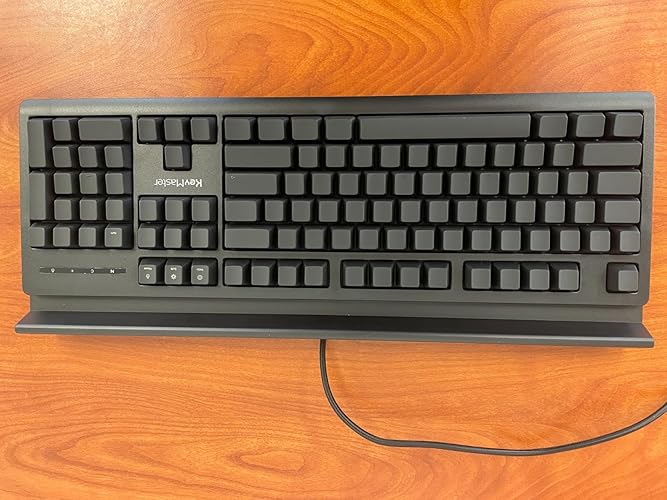
NO MORE LOOKING AT COMPUTER KEYS; on/off backlighting quickly shows or hides keyboard lettering leading to faster memorization of the keyboard and improved typing speed.

Fast
Shipping

Free
Return*

Secure Packaging

100% Original Products

PCI DSS Compliance

ISO 27001 Certified


Note: Step Down Voltage Transformer required for using electronics products of US store (110-120). Recommended power converters Buy Now.


What Stands Out
Custom Visibility
The SHOW/HIDE keys offer customizable visibility, allowing users to switch between blank and visible keys, catering to personal preferences for enhanced typing comfort and adaptability.
Backlit Key Caps
Backlit shine-through key caps provide a stunning visual experience, ensuring that typing in low-light environments is not only easy but also aesthetically pleasing for users seeking style and function.
Mechanical Quality
The Keymaster's mechanical design delivers superior tactile feedback and durability, outperforming traditional typing skins and covers, making it an excellent choice for dedicated typists and gamers.
Product Details
- NO MORE LOOKING AT COMPUTER KEYS; on/off backlighting quickly shows or hides keyboard lettering leading to faster memorization of the keyboard and improved typing speed
- LEARN TO TYPE BY TOUCH; designed by expert teachers and suitable for learners of all ages; great teaching tool for emerging typists; curved keys and deeper strike maximize key by touch identification; black out individual keys or entire keyboard to customize touch type mastery
- DUAL-PURPOSE SHOW/HIDE KEYS can be visible for standard computer use and blacked out during touch type practice; standard USB connection compatible with Windows, Macintosh & Chrome operating systems
- EASY TO USE keyboard compatible with all educational keyboarding software helps typists memorize the keyboard faster and better than traditional keyboard skins or covers, improving precision, speed and finger placement
- BUILT TO LAST ergonomic mechanical keyboard with durable aluminum frame for exceptional quality and performance; full sized 104 key layout with kickstand and device holder for ultimate versatility; water resistant
| Compatible Devices | Mac, Windows, and Chrome Operating Systems |
| Connectivity Technology | USB 2.0, USB 3.0 |
| Additional Features | Shine through blank or visible keycaps |
| Keyboard Backlighting Color Support | Single Color |
| Power Source | Corded |
| Switch Type | Silent Linear |
| Keyboard Layout | QWERTY |
| Hand Orientation | Ambidextrous |
| Button Quantity | 104 |
| Water Resistance Level | Water Resistant |
| Mechanical Keyboard Switch Model | Outemu Red |
| Minimum Required Operating System Version | ChromeOs 134 |
| Compatible Operating System Family | ChromeOS, MacOS, Windows |
| Compatible Tablet Computer Models | AAUB P30 |
| Number of Keys | 104 |
| Number of Sections | 4 |
| Color | black |
| Style Name | 2.0 Learning Lights Keyboard |
| Theme | 2.0 KeyMaster Keyboard |
| Brand | KeyMaster Electronics |
| Keyboard Description | Corded |
| Antenna Location | Education |
| Built-In Media | USB Cable |
| Model Number | 2.1 |
| Model Name | 2.1 KeyMaster Keyboard |
| Series Number | 2 |
| Global Trade Identification Number | 00860001770308 |
| Unit Count | 1.0 Count |
| Manufacturer | KeyMaster Electronics |
| Item Weight | 26 Ounces (737.1 grams) |
| Generation | 2.0 Learning Lights Keyboard (Feb 2023) |
| Item Dimensions L x W x H | 17.5"L x 7"W x 1.5"H (44.5 x 17.8 x 3.8 cm) |
| Enclosure Material | Polycarbonate |
| Keyboard Plate Material | Aluminum |
| Recommended Uses For Product | Education |
| Special Feature | Shine through blank or visible keycaps |
| Keyboard backlighting color support | Single Color |
| Style | 2.0 Learning Lights Keyboard |
| Product Dimensions (L x W x H) | 17.5"L x 7"W x 1.5"H (44.5 x 17.8 x 3.8 cm) |
What's in the box
USB Cable
Who Should Buy?

-
Typing Beginners
Ideal for those learning to type, as it has customizable visibility options that enhance learning and practice.
-
Gamers
Great for gamers who prefer mechanical keyboards, offering backlighting for immersive gaming experiences during dark sessions.
-
Creative Professionals
Suitable for graphic designers or developers needing flexible visibility options for efficient workflow in varying light conditions.

-
General Users
Basic users may find it unnecessary, as standard keyboards provide sufficient functionality for casual typing tasks.
-
Budget-Conscious
Those on a tight budget might struggle with the price point, considering alternative keyboards with fewer features.
-
Minimalists
Users favoring simplicity may find the complicated features excessive and opt for straightforward keyboard designs instead.
Product Description
Have any Query? Chat with us
Customer Questions & Answers
-
Question:
What is the Learn to Type Keyboard, and how does it help with typing skills?
Answer: The Learn to Type Keyboard is specifically designed to aid learners in touch typing. It features unique key caps that can be displayed or hidden for visual guidance. This allows students to practice typing without looking at the keyboard, enhancing their muscle memory. Using it in classrooms or at home encourages consistent practice, helping users transition from novice to proficient typists quickly. -
Question:
What are shine-through key caps, and why are they useful?
Answer: Shine-through key caps are designed to illuminate the symbols on the keys when backlit, making it easier to identify letters and characters. This feature is particularly beneficial for beginners who are still learning the keyboard layout and for those typing in low-light environments. This added visibility promotes confidence and can significantly improve typing speed over time. -
Question:
Can the visibility of the keys be adjusted or turned off?
Answer: Yes, the Learn to Type Keyboard allows users to show or hide key visibility as needed. This flexibility is essential for learners who are progressing in their typing skills. Beginners can start with key visibility to understand the layout, and as they gain confidence, they can hide the labels to practice touch typing, enabling a smoother transition into proficient typing. -
Question:
Is the Keymaster Mechanical keyboard suitable for advanced users as well?
Answer: Absolutely! While it caters to beginners with its unique features designed for learning, the Keymaster Mechanical keyboard’s durable construction and responsive keys also appeal to experienced typists. Advanced users will appreciate the tactile feedback and the high-quality build, making it ideal for both typing practice and professional use. -
Question:
What activities are suitable for using the Learn to Type Keyboard?
Answer: The Learn to Type Keyboard is perfect for various activities including typing classes, home schooling, and self-study sessions. It's also useful for anyone wanting to develop better typing habits, such as writers, content creators, or professionals seeking to enhance their typing speed and accuracy. Integrating it into daily practice can significantly bolster one’s typing proficiency. -
Question:
What makes the Keymaster Mechanical design unique?
Answer: The Keymaster Mechanical design stands out due to its customizable key feedback and durability. Each key is engineered for longevity and comfort, providing an optimal typing experience. Additionally, the mechanical switch technology makes it suitable for different types of users, from casual typists to gamers who require rapid response times. This versatility makes it a top choice among diverse groups. -
Question:
Can the keyboard help in developing good typing habits from a young age?
Answer: Definitely! The Learn to Type Keyboard is an excellent tool for instilling good typing habits in children and younger users. Its design encourages proper hand placement and posture, which are crucial for long-term efficiency and health. By using this keyboard for practice, younger users can develop a solid foundation for typing that will benefit them throughout their academic and professional lives. -
Question:
What types of users benefit the most from the Learn to Type Keyboard?
Answer: The Learn to Type Keyboard is especially beneficial for students, educators, and professionals looking to enhance their typing skills. Students can improve their speed and accuracy, while educators can utilize the keyboard as a teaching tool. Professionals in office environments also find it valuable for maintaining productivity and reducing typing errors, which ultimately enhances their workflow. -
Question:
How do the customizable features of this keyboard enhance usability?
Answer: Customizable features of the Learn to Type Keyboard, such as key visibility and mechanical switch options, enhance usability by catering to individual preferences. Users can tailor their typing experience to align with their comfort levels and skill stages. This personalized adaptability allows both beginners and seasoned typists to optimize their efficiency and learn effectively. -
Question:
Where can I buy the Practice Typing with Learn to Type Keyboard in Myanmar?
Answer: You can purchase the Practice Typing with Learn to Type Keyboard on Ubuy. Ubuy offers a convenient shopping experience with a wide selection of products, ensuring that you can easily find and order the keyboard online. With their user-friendly interface and extensive shipping options, Ubuy is an ideal choice for acquiring this educational tool in Myanmar.
KeyMasterElectronics Keyboards 2.1 Editorial Review



No editorial reviews found
Customer Reviews & Ratings
57 customers ratings
-
5 Star
71%
-
4 Star
8%
-
3 Star
3%
-
2 Star
8%
-
1 Star
10%
Review this product
Share your thoughts with other customers
Platform Trust & Buyer Confidence

MT
Mohd
Verified buyer
“The product received very good packaging & safe…Thank You”
16 June 2026 · via Trustpilot
SJ
Shawati
Verified buyer
“Accurate delivery timing given”
16 June 2026 · via Trustpilot
YB
Youcef
Verified buyer
“Not madly expensive like I thought, and much quicker than promised.”
15 June 2026 · via Trustpilot
LM
Leila
Verified buyer
“Never dealt with Ubuy before, but everything worked out great. Seamless cross border purchasing and shipping. Thanks!”
6/7/2026 · via Trustpilot
KA
Kwame
Verified buyer
“The process was smooth, with clear communication and timelines. This was my 1st purchase and I am really impressed. I will definitely be coming back.”
12 June 2026 · via Trustpilot
Secure Checkout
Global Delivery
Easy Returns
Genuine Products
Product Price History
Important information
- Limitations : For products shipped internationally, please note that any manufacturer warranty may not be valid; manufacturer service options may not be available; product manuals, instructions, and safety warnings may not be in destination country languages; the products (and accompanying materials) may not be designed in accordance with destination country standards, specifications, and labeling requirements; and the products may not conform to destination country voltage and other electrical standards (requiring use of an adapter or converter if appropriate). The recipient is responsible for assuring that the product can be lawfully imported to the destination country. When ordering from Ubuy or its affiliates, the recipient is the importer of record and must comply with all laws and regulations of the destination country.
- Not all the products listed on Ubuy are for sale, as Ubuy is a global search engine. Products are subject to export/trade regulations.
MMK 329916
Order now and get it around Saturday, July 11
This item is not restrict in my country.(Please click on above link if this item is not restrict in your country, So our team will review and allow.)
QTY:
Only 11 items left in stock.
Secured transaction
Ubuy works hard to protect your security and privacy. Our advanced payment security system ensures confidentiality by encrypting your information during transmission using AES (Advanced Encryption Standards) and SSL (Secure Socket Layer) protocols. Your payment details are 100% secure as we do not share your payment details with third party sellers.
Our Top Logistics Partners
Fastest cross-border delivery
Features & Benefits
- Eliminate dependence on looking at keys with innovative backlighting.
- Features a dual-purpose show/hide key system for effective learning.
- Designed by experts, ideal for touch typing practice for all ages.
- Ergonomic design with durable aluminum frame for long-lasting use.
- Compatible with all major operating systems and educational software.
- Improves typing precision, speed, and finger placement over traditional solutions.