- Home Page /
- Electronics /
- Television & Video /
- Television Accessories /
- Remote Controls /
- Projector Remote Control for Ricoh PJ S2130, ...
0 ratings

Item #:
82740147
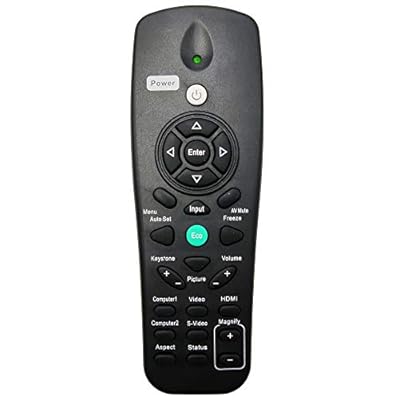
Projector Remote Control for Ricoh PJ S2130, PJ WX2130, PJ WX5140, PJ WX5150, PJ X2130
Item #:
82740147
MMK 118443
Price Details
Excluding Shipping & Custom charges ( Shipping and custom charges will be calculated on checkout )
*All items will import from US
0 ratings
Write a review
In stock
 Imported from USA store
QTY:
Order now and get it around Thursday, August 06
Secured transaction
Ubuy works hard to protect your security and privacy. Our advanced payment security system ensures confidentiality by encrypting your information during transmission using AES (Advanced Encryption Standards) and SSL (Secure Socket Layer) protocols. Your payment details are 100% secure as we do not share your payment details with third party sellers.
Our Top Logistics Partners


A perfect replacement to your old or lost remote control; less cost with solid quality and better usage experience.

Fast
Shipping

Free
Return*

Secure Packaging

100% Original Products

PCI DSS Compliance

ISO 27001 Certified


Note: Step Down Voltage Transformer required for using electronics products of US store (110-120). Recommended power converters Buy Now.


What Stands Out
Wide Compatibility
Designed specifically for various Ricoh projector models, ensuring seamless integration and functionality across the PJ KU1200, LU7000, LU8000, WUL6280, WUL6281, WUL6380, and WXL6280 for enhanced usability.
User-Friendly Design
Ergonomically crafted to provide intuitive navigation, the remote control features clearly labeled buttons for effortless operation, making it easy for users of all experience levels to manage presentations smoothly.
Durable Quality
Constructed with premium materials for long-lasting performance, this remote control is built to withstand regular use, ensuring reliability during crucial presentations without concerns over wear or malfunction.
Product Details
| Item Weight | 0.5 lbs (230 grams) |
Who Should Buy?

-
Presenters
Ideal for presenters who need seamless remote control during lectures or business meetings, enhancing ease of use.
-
Educational Use
Great for teachers using Ricoh projectors in classrooms, allowing remote operation without disruption to the lesson.
-
Event Coordinators
Helpful for event coordinators managing AV equipment at conferences or events, offering convenience in controlling projector functions.

-
Casual Users
Not suitable for casual users who rarely use projectors, as functionality may not justify the purchase.
-
Non-Ricoh Models
Users with projectors from other brands will find this remote incompatible and therefore not useful.
-
Tech Novices
Not ideal for those unfamiliar with technology, as programming or troubleshooting may be challenging without guidance.
Product Description
Projector Remote Control for Ricoh PJ S2130, PJ WX2130, PJ WX5140, PJ WX5150, PJ X2130
Have any Query? Chat with us
Customer Questions & Answers
-
Question:
What models is the Projector Remote Control compatible with?
Answer: The Projector Remote Control is specifically designed for use with multiple Ricoh projector models, including the PJ HD5451, PJ S2440, PJ WX2440, PJ WX5461, PJ WX5770, PJ WXL5670, PJ X100ST, PJ X2440, PJ X2650, and PJ X2670. This extensive compatibility makes it an ideal choice for users who own these projectors, ensuring seamless operation without any compatibility issues. Whether you need to switch slides during a presentation or adjust projector settings from a distance, this remote control covers all your needs. -
Question:
How do I set up the Projector Remote Control?
Answer: Setting up the Projector Remote Control is quick and straightforward. Simply insert the required batteries, which are specified in the manual. Once the batteries are placed correctly, point the remote at the projector and press the corresponding button to ensure that it pairs successfully. This user-friendly setup process allows you to start using your remote instantly, providing a hassle-free experience, whether you're in a corporate meeting or hosting a movie night. -
Question:
Does the remote require any special setup or software?
Answer: No special setup or software is required for the Projector Remote Control. It operates using infrared technology, allowing it to communicate directly with the Ricoh projector upon pressing the buttons. This plug-and-play functionality ensures that users can quickly start using the remote without needing to install any drivers or software. Perfect for users who prefer effortless operation, this remote control allows quick transitions during presentations or lectures. -
Question:
What features does the Projector Remote Control offer?
Answer: The Projector Remote Control typically features buttons for navigating through slides, adjusting volume, and controlling projector settings, such as brightness and focus. Some models may also include shortcuts for specific functions, which enhance user experience. These intuitive features streamline presentation delivery, making it easier for users to focus on their content rather than fumbling with the projector itself, thereby enhancing overall productivity. -
Question:
Are there specific batteries required for the remote control?
Answer: Yes, the Projector Remote Control typically requires AAA batteries. It is essential to check the user manual for specific battery recommendations. Using the correct batteries ensures optimal performance, allowing you to utilize the remote effectively without interruptions during your presentations or movie viewing. Keeping spare batteries on hand can also be helpful for extended usage during events. -
Question:
Can I use this remote for other projector brands?
Answer: The Projector Remote Control is designed specifically for Ricoh projectors and is unlikely to function effectively with other brands. Due to differing infrared protocols and button functionalities, compatibility is limited to the specified Ricoh models. Users who own projectors from different brands should look for remotes specifically tailored for their respective models to ensure proper operation. -
Question:
Is there a range limitation on how far I can use the remote?
Answer: The effective range for the Projector Remote Control is typically around 30 feet, depending on the environment and potential obstacles. Clear line-of-sight between the remote and the projector enhances functionality. This extended range is particularly useful in larger rooms or auditoriums, providing convenience for presenters who need to move around while engaging their audience. -
Question:
What should I do if the remote stops working?
Answer: If the Projector Remote Control stops working, first check the batteries to ensure they are installed correctly and still have charge. If the batteries are fine, try resetting the remote by removing the batteries for a few minutes and then reinserting them. If it still doesn’t work, ensure there’s no obstruction blocking the infrared sensor on the projector. These troubleshooting steps often resolve common issues and restore functionality quickly. -
Question:
Where can I buy the Projector Remote Control for Ricoh models?
Answer: You can purchase the Projector Remote Control for Ricoh PJ HD5451, PJ S2440, PJ WX2440, PJ WX5461, PJ WX5770, PJ WXL5670, PJ X100ST, PJ X2440, PJ X2650, and PJ X2670 from Ubuy. This platform offers a reliable way to source the remote, ensuring you receive the right product for your projector needs. -
Question:
What is the advantage of using a remote control with a projector?
Answer: Using a remote control with a projector enhances flexibility and convenience during presentations or movie screenings. It allows users to navigate slides, adjust settings, and manage volume without being tethered to the projector. This advantage is especially beneficial in settings like classrooms or conference rooms, where interaction with the audience is key. A remote frees you to engage more dynamically, improving the overall impact of your delivery.
INTECHING Remote Controls Editorial Review
No editorial reviews found
Customer Reviews & Ratings
1 customers ratings
-
5 Star
100%
-
4 Star
0%
-
3 Star
0%
-
2 Star
0%
-
1 Star
0%
Review this product
Share your thoughts with other customers
Platform Trust & Buyer Confidence

MT
Mohd
Verified buyer
“The product received very good packaging & safe…Thank You”
16 June 2026 · via Trustpilot
SJ
Shawati
Verified buyer
“Accurate delivery timing given”
16 June 2026 · via Trustpilot
YB
Youcef
Verified buyer
“Not madly expensive like I thought, and much quicker than promised.”
15 June 2026 · via Trustpilot
LM
Leila
Verified buyer
“Never dealt with Ubuy before, but everything worked out great. Seamless cross border purchasing and shipping. Thanks!”
6/7/2026 · via Trustpilot
KA
Kwame
Verified buyer
“The process was smooth, with clear communication and timelines. This was my 1st purchase and I am really impressed. I will definitely be coming back.”
12 June 2026 · via Trustpilot
Secure Checkout
Global Delivery
Easy Returns
Genuine Products
Product Price History
Important information
- Limitations : For products shipped internationally, please note that any manufacturer warranty may not be valid; manufacturer service options may not be available; product manuals, instructions, and safety warnings may not be in destination country languages; the products (and accompanying materials) may not be designed in accordance with destination country standards, specifications, and labeling requirements; and the products may not conform to destination country voltage and other electrical standards (requiring use of an adapter or converter if appropriate). The recipient is responsible for assuring that the product can be lawfully imported to the destination country. When ordering from Ubuy or its affiliates, the recipient is the importer of record and must comply with all laws and regulations of the destination country.
- Not all the products listed on Ubuy are for sale, as Ubuy is a global search engine. Products are subject to export/trade regulations.
MMK 118443
Order now and get it around Thursday, August 06
This item is not restrict in my country.(Please click on above link if this item is not restrict in your country, So our team will review and allow.)
QTY:
Secured transaction
PCI DSS compliant and ISO 27001:2022 certified, with encrypted payments and full buyer protection on every order.
Our Top Logistics Partners
Fastest cross-border delivery
Features & Benefits
- Brand new and durable replacement remote control.
- Well responsive to every key press for hassle-free operation.
- Cost-effective alternative to old or lost remotes.
- Compatible with multiple Ricoh projector models.
- Requires 2 AAA batteries (not included).
- Enhances user experience with solid quality.
Ubuy Assurance
Experience worry-free shopping with 100% original products, PCI DSS-compliant payment security, ISO 27001-certified data protection, the fastest cross-border delivery, free returns *, and secure packaging on every order.