0 ratings


Item #:
131067091
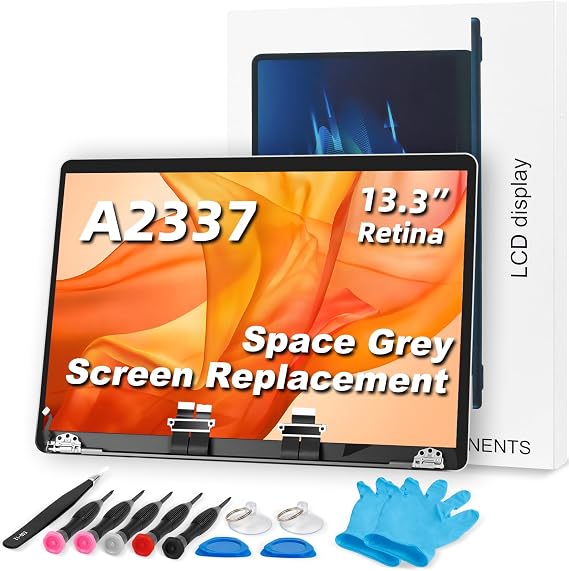
Screen Replacement A2337 LCD for M1 MacBook Air 13.3" 2020 A2337 MGN63 EMC 3598 MGN93 MGND3 MGN73 MGNA3 MGNE3 25601660 LCD Screen Full Top Assembly
73% of respondents would recommend this to a friend
Item #:
131067091
MMK 1082473
Price Details
Excluding Shipping & Custom charges ( Shipping and custom charges will be calculated on checkout )
*All items will import from US
0 ratings
Write a review
In stock
 Imported from USA store
QTY:
Order now and get it around Friday, October 16
Secured transaction
Ubuy works hard to protect your security and privacy. Our advanced payment security system ensures confidentiality by encrypting your information during transmission using AES (Advanced Encryption Standards) and SSL (Secure Socket Layer) protocols. Your payment details are 100% secure as we do not share your payment details with third party sellers.
Our Top Logistics Partners


Make your device look new with our fully assembled LCD screen replacement designed for the A2338!

Fast
Shipping

Free
Return*

Secure Packaging

100% Original Products

PCI DSS Compliance

ISO 27001 Certified



Note: Step Down Voltage Transformer required for using electronics products of US store (110-120). Recommended power converters Buy Now.


What Stands Out
High Resolution
This LCD screen boasts a dazzling 2560×1660 resolution, delivering crystal-clear visuals and vibrant colors, enhancing your viewing experience for both work and entertainment.
Perfect Compatibility
Designed specifically for the M1 MacBook Air 2020, this replacement ensures a seamless fit and functionality, making restoration hassle-free without compromising quality or performance.
Full Top Assembly
This full top assembly includes all necessary components, providing a complete solution for screen replacement, saving you time and effort during your repair process.
Product Details
| Item Weight | 1.5 lbs (680 grams) |
Who Should Buy?

-
Frugal Users
Budget-conscious individuals seeking an affordable solution to repair their MacBook Air without buying a new device.
-
DIY Enthusiasts
Tech-savvy users comfortable with performing their own repairs and looking to save on professional service fees.
-
MacBook Owners
Users of the M1 MacBook Air who need a quality replacement screen after accidental damage or malfunction.

-
Non-technical Users
Individuals lacking the skills or tools necessary for replacing the screen may struggle with installation.
Product Description
Screen Replacement A2337 LCD for M1 MacBook Air 13.3" 2020 A2337 MGN63 EMC 3598 MGN93 MGND3 MGN73 MGNA3 MGNE3 25601660 LCD Screen Full Top Assembly Display (Space Gray)
Have any Query? Chat with us
Customer Questions & Answers
-
Question:
What models are compatible with the Screen Replacement A2337 LCD for M1 MacBook Air?
Answer: The Screen Replacement A2337 LCD is designed specifically for the M1 MacBook Air 13" 2020 model, including variants A2337 MGN63, MGN93, MGND3, MGN73, MGNA3, and MGNE3. This means if you have an M1 MacBook Air that fits one of these model numbers, this screen replacement will work perfectly. Understanding compatibility is crucial as it ensures that the screen replacement will fit and function as expected, allowing you to restore your device to optimal performance. -
Question:
What is the resolution of the A2337 LCD screen?
Answer: The A2337 LCD screen offers a resolution of 2560×1660 pixels, providing sharp and vibrant visuals that enhance your viewing experience. This high-resolution display ensures that images and text appear crisp, making it ideal for tasks ranging from graphic design to everyday computing. For users who frequently work with high-definition content or enjoy streaming video, this resolution delivers stunning clarity and detail. -
Question:
How do I replace the screen on my M1 MacBook Air?
Answer: Replacing the screen on your M1 MacBook Air involves careful disassembly and precision. First, make sure to power off the device and disconnect it from any power source. You would typically need tools like a pentalobe screwdriver to remove the screws on the bottom casing, followed by removing the battery and disconnecting the existing LCD from the motherboard. It’s recommended to follow a step-by-step guide or video tutorial for this process to avoid damaging any components. If you're not confident, consider seeking professional help for the installation. -
Question:
Is the A2337 LCD screen original Apple equipment?
Answer: The A2337 LCD screen replacement is an aftermarket product, not originally manufactured by Apple. While it may not be OEM (original equipment manufacturer), many aftermarket products are produced with similar quality standards, offering a reliable alternative. When choosing a screen replacement, ensure it comes from a reputable supplier to ensure durability and performance that align closely with original components. -
Question:
What tools do I need to install the A2337 LCD screen?
Answer: To install the A2337 LCD screen, you will need a few essential tools: a precision screwdriver set (specifically, a pentalobe and Phillips head), a spudger, and tweezers for handling delicate components. These tools will help you carefully remove the old screen and install the new one without damaging any internal parts. Having the right tools is critical to ensure a smooth installation process and to prevent potential mishaps. -
Question:
Do I need professional help to replace the A2337 LCD?
Answer: While it is possible to replace the A2337 LCD on your own if you have some technical skill, professional help is often advisable, especially for those unfamiliar with electronics repair. Professionals have the experience and tools required to ensure the screen is replaced correctly, reducing the risk of errors that could further damage your device. If you're unsure about your ability to complete the task safely, consulting with a professional can save time and avoid additional costs. -
Question:
What should I do if the new screen does not work?
Answer: If the new A2337 LCD screen does not function properly after installation, it may be due to several factors, such as a faulty screen, incorrect connections, or compatibility issues. Start by checking all connections to ensure they are secure. If everything appears connected but the screen is still not working, test the LCD in another unit, if possible, to confirm its functionality. If problems persist, consult the seller or a professional technician for further assistance. -
Question:
Can I clean the LCD screen after installation?
Answer: Yes, you can clean the newly installed A2337 LCD screen to maintain its clarity and prevent dust buildup. Use a microfiber cloth slightly dampened with water or a dedicated screen cleaner to gently wipe the surface. Avoid harsh chemicals or abrasive materials that could damage the screen's coating. Regular cleaning is especially useful for those who frequently use their MacBook Air in various environments, helping to preserve the quality of the display. -
Question:
How do I ensure the longevity of my new screen?
Answer: To ensure the longevity of your new A2337 LCD screen, handle your device with care, avoid applying excessive pressure on the screen, and use a protective case when transporting it. Additionally, keeping the device away from extreme temperatures and moisture can prevent issues that might affect screen performance over time. By taking these precautions, you can significantly enhance the lifespan of your replacement screen and maintain your MacBook Air's functionality. -
Question:
Where can I buy Screen Replacement A2337 LCD for M1 MacBook Air 13" 2020?
Answer: You can purchase the Screen Replacement A2337 LCD for M1 MacBook Air 13" 2020 at Ubuy. They offer a wide selection of compatible parts for your device, ensuring you find the right fit. Ubuy's user-friendly platform makes it easy to navigate and locate the specific screen you need, providing you with quality and convenience in one place. Make sure to check for compatibility with your exact model before making a purchase.
JYYSCRN Replacement Screens Editorial Review
No editorial reviews found
Customer Reviews & Ratings
1 customers ratings
-
5 Star
100%
-
4 Star
0%
-
3 Star
0%
-
2 Star
0%
-
1 Star
0%
Review this product
Share your thoughts with other customers
Platform Trust & Buyer Confidence

JK
Jasmin
Verified buyer
“Great products and very good service: very easy and very fast international delivery.”
9 September 2026 · via Trustpilot
AG
Anke
Verified buyer
“Wonderful online shopping experience, smooth transaction from the start. Payment method works conveniently and delivery is unexpectedly fast and reliable. You go the extra mile for service. What makes this even more amazing, you deliver to Namibia. I will remain a happy Ubuy customer and will increase my purchases for sure! Thank you!”
10 September 2026 · via Trustpilot
H
Hazel
Verified buyer
“Very easy to find the products what you need, and so fast delivery, that’s why I highly recommended to others costumers to used ubuy.”
10 September 2026 · via Trustpilot
O
Opaleye
Verified buyer
“I received exactly what I ordered I was skeptical about your site because that was my first time to order. But the order came timely and neatly packaged. I was not disappointed. Thank you.”
11 September 2026 · via Trustpilot
AC
Adele
Verified buyer
“Easy to find and order what you want on the website. Delivery is quick to the UK”
8 September 2026 · via Trustpilot
Secure Checkout
Global Delivery
Easy Returns
Genuine Products
Product Price History
Important information
- Limitations : For products shipped internationally, please note that any manufacturer warranty may not be valid; manufacturer service options may not be available; product manuals, instructions, and safety warnings may not be in destination country languages; the products (and accompanying materials) may not be designed in accordance with destination country standards, specifications, and labeling requirements; and the products may not conform to destination country voltage and other electrical standards (requiring use of an adapter or converter if appropriate). The recipient is responsible for assuring that the product can be lawfully imported to the destination country. When ordering from Ubuy or its affiliates, the recipient is the importer of record and must comply with all laws and regulations of the destination country.
- Not all the products listed on Ubuy are for sale, as Ubuy is a global search engine. Products are subject to export/trade regulations.
MMK 1082473
Order now and get it around Friday, October 16
This item is not restrict in my country.(Please click on above link if this item is not restrict in your country, So our team will review and allow.)
QTY:
Secured transaction
PCI DSS compliant and ISO 27001:2022 certified, with encrypted payments and full buyer protection on every order.
Our Top Logistics Partners
Fastest cross-border delivery
Features & Benefits
- Perfect for A2338 screen replacement.
- Repairs cracked, broken, and malfunctioning screens.
- Includes all necessary components: LCD, back cover, data cable, camera, and backlight.
- Carefully tested to ensure perfect functionality.
- Easy installation with a provided guide.
- Reliable customer service available for inquiries.
Ubuy Assurance
Experience worry-free shopping with 100% original products, PCI DSS-compliant payment security, ISO 27001-certified data protection, the fastest cross-border delivery, free returns *, and secure packaging on every order.